
- Kataloge
- PROMAX ELECTRONICA
- RM-204 PkWatch


RM-204 PkWatch

RM-204 PkWatch
Das PKWatch-Programm ist eine von MS ACCESS generierte Datenbank, die für die Überwachung und umfangreiche Datenprotokollierung mit einem PROLINK-4 als Signalmesseinstrument entwickelt wurde. Es eignet sich besonders für die langfristige Überwachung in TV-, Radio-, Satelliten- oder Kabel-TV-Umgebungen. Das Programm steuert den PROLINK-4 gemäß einer vom Benutzer ausgewählten Messsequenz und kann Daten speichern, drucken und grafisch darstellen. Bei ordnungsgemäßer Konfiguration kann das System SMS-Nachrichten bei Testfehlern senden.
In diesem Menü kann der Benutzer eine Überwachungssequenz definieren, die den zu testenden Kanal oder die Frequenz, die durchzuführende Messung und die anzuwendenden Pass/Fail-Grenzen umfasst. Jeder Testpunkt muss Informationen wie Digital/Analog, Label, Frequenz, Testnummer und Messung enthalten. Die Messungen werden in einer festgelegten Reihenfolge durchgeführt, und die Ergebnisse werden als PASS oder FAIL bewertet.
Das Monitor-Menü ist der Hauptbildschirm der PKWatch-Überwachungssoftware und besteht aus vier Bereichen: Aktueller Test, Messprotokoll, Status und Alarmprotokoll. Der aktuelle Test zeigt die Daten des laufenden Tests an, während das Messprotokoll die Ergebnisse speichert. Der Statusbereich enthält Schaltflächen zum Starten und Stoppen des Überwachungsprozesses, und das Alarmprotokoll speichert Informationen über fehlgeschlagene Messungen.
Dieses Menü ermöglicht die Konfiguration des GSM-Modems zur Versendung von SMS-Nachrichten bei Messfehlern. Für den normalen Betrieb müssen die Service-Center-Adresse, die PIN-Nummer und die GSM-Zielnummer eingegeben werden. Im erweiterten Betrieb können Testnachrichten gesendet und AT-Befehle zur Modemkonfiguration verwendet werden.
Katalogauszüge
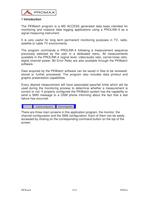
1 Introduction The PKWatch program is a MS ACCESS generated data base intended formonitoring and massive data logging applications using a PROLINK-4 as asignal measuring instrument. It is very useful for long term permanent monitoring purposes in TV, radio,satellite or cable TV environments. The program commands a PROLINK-4 following a measurement sequencepreviously selected by the user in a dedicated menu. All measurementsavailable in the PROLINK-4 (signal level, video/audio ratio, carrier/noise ratio, digital channel power, Bit Error Rate) are also available through the PKWatch software.Data...
Katalog auf Seite 2 öffnen
2 Channel configuration This menu allows the user to define a monitoring sequence including channel or frequency to be tested, measurement to be made and pass fail limits to beapplied. All these data together form a test point. Every test point must contain following information:Digital. One of the first things to do if the test point refers to a TV channel is to determine whether it is digital or analogue. This is important since some of the functions will act accordingly. For example if the frequency is recalled using the label foldable list the tuning frequency will be the centre of the channel...
Katalog auf Seite 3 öffnen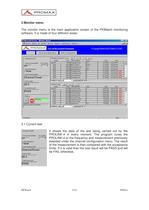
3 Monitor menu The monitor menu is the main application screen of the PKWatch monitoringsoftware. It is made of four different areas: 3.1 Current testIt shows the data of the test being carried out by thePROLINK-4in every moment. The program tunes thePROLINK-4 to the frequency and measurement previously selected under the channel configuration menu. The result of the measurement is then compared with the acceptance limits. If it is valid then the test result will be PASS and will be FAIL otherwise. > PKWatch5/1409/04/a size="-1">
Katalog auf Seite 5 öffnen
4 SMS configuration One of the most outstanding features of the PKWatch monitoring system is the capability to send messages through the GSM network including informationabout the measurement failures that may occur.The system includes a GSM modem which needs to be properly configured to be able to send SUCH SMS messages. The SMS CONFIGURATION menuhelps to go through all this process easily. 4.1 Normal operation set upThis section contains the most important and basic functions to permit normal SMS message operation in the PKWatch. The GSM modem installed in the PKWatch system must contain the...
Katalog auf Seite 12 öffnen
4.2 Advanced operation set upThe first function available in the advanced operation section is to test theoperation of the SMS message service once the modem has been logged to the network. This is made by manually sending a trial message. To do that justwrite the desired text in the Test messageӔ window and click on the Send SMS The AT commands are a standard set of commands that are used by GSMdevices such as GSM modems. The GSM modem in the PKWatch system iscompatible with GSM aөsfojasdf AT commands (see Annex A).AT commands can be used to enter PUK numbers, check network status,change configuration...
Katalog auf Seite 14 öffnenAlle Kataloge und technischen Broschüren von PROMAX ELECTRONICA
 HD RANGER +
12 Seiten
 IL-185 Luxmeter
1 Seite
 GF-857 Funktionsgenerator
1 Seite
 MO-160 DVB-T Modulator
2 Seiten
 MO-180 DVB-T and DVB-H modulator
2 Seiten
 GV-198 TV Farbgenerator
2 Seiten
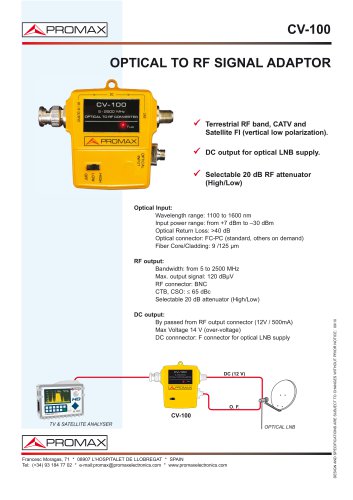 CV-100
1 Seite
 PROMAX-12
2 Seiten
 CV-223
1 Seite
 HD RANGER Lite
2 Seiten
 PROLITE-30B
1 Seite
 HD RANGER 3
8 Seiten
 HD RANGER 2
19 Seiten
 AE-766, AE-767 Spectrum analyser
2 Seiten
 MO-170 DVB-T and DVB-H Modulator
2 Seiten


- Netzteil
- DC-Stromversorgung
- AC/DC-Netzteil
- Analysator für Flüssigkeiten
- Infrarot-Imager
- Überwachungs-Imager
- Benchtop-Analysator
- Tragbarer Analysator
- Digitaler Tester
- Thermographische Kamera
- Signalverstärker
- Wasser-Analysator
- Tischnetzteil
- Generator
- Multimeter
- Einstellbares Netzteil
- Digitales Multimeter
- Tragbares Multimeter
- Programmierbare Stromversorgung
- Leistungsverstärker